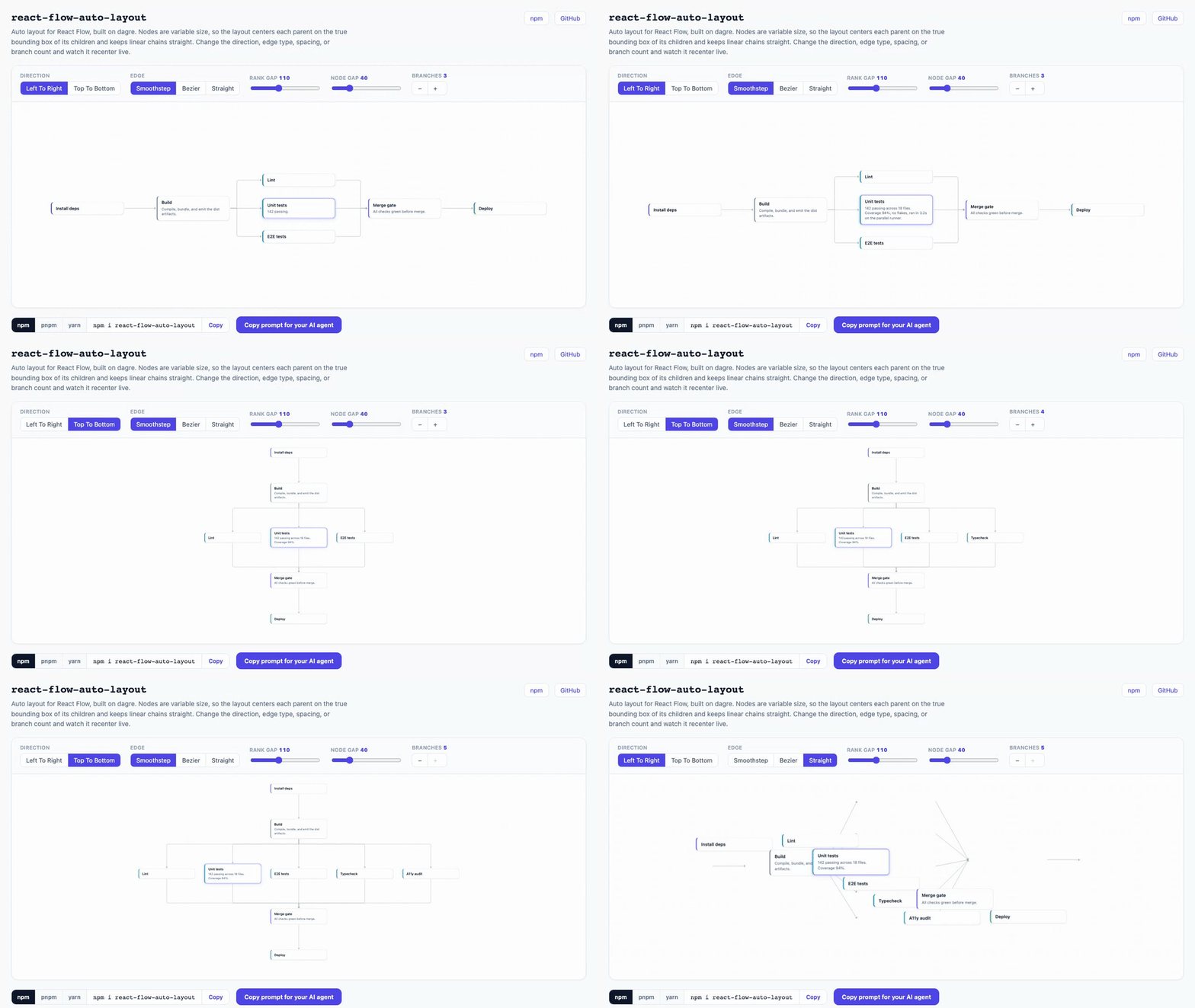
Auto layout for React Flow, built on dagre. The one that handles variable-size nodes: true bounding-box centering and straight linear edges, no kinks.





import { useAutoLayout } from "react-flow-auto-layout/react";

function Graph({ sourceNodes, sourceEdges }) {
  const { nodes, edges, onNodesChange, onEdgesChange } = useAutoLayout({
    nodes: sourceNodes,
    edges: sourceEdges,
  });

  return (
    <ReactFlow
      nodes={nodes}
      edges={edges}
      onNodesChange={onNodesChange}
      onEdgesChange={onEdgesChange}
      nodeTypes={nodeTypes}
    />
  );
}
That is the whole thing. Your nodes render hidden, get measured, lay out on their real sizes, and reveal. No manual measurement dance, no fixed-height guessing.
Dagre is the usual answer for laying out a React Flow graph, and for uniform boxes it is fine. Three things break the moment your nodes are real cards with variable content:
- Variable-size nodes. Dagre assumes fixed dimensions. A card with a two-line title is taller than its neighbor, and a naive pass does not account for it, so siblings sit misaligned and cards overlap.
- Centering drifts. Dagre centers a parent on its children's barycenter (the average of their centers). When siblings differ in size, that is not the visual middle. This library centers each parent on the true bounding box of its children, so it sits dead center.
- Linear edges kink. In a plain
A → B → Cchain, each node ends up at its own center, so the connector bends even though it is one straight line. This library snaps single-in / single-out chains colinear, so straight runs render straight (xyflow/xyflow#3218).
It also keeps fan-out branches in your declared edge order instead of letting dagre's crossing-minimisation reshuffle them.
- 🎯 True bounding-box centering, not dagre's drifting barycenter
- 📏 Variable width and height per node, from real measurements
- 📐 Straight linear edges, no kinks on
A → B → Cruns - 🔀 Fan-out in your edge order, not reshuffled
- 🪢 Aligned step-edge elbows across variable-size nodes (optional
AlignedStepEdge) ↕️ Left-to-right or top-to-bottom, one flag- 🪝 A hook that does the measuring for you, or a pure function if you would rather
- 🎨 No CSS to import. It only computes positions; style your nodes however you like
- 🧊 Zero runtime deps of its own (dagre + React Flow are peers)
- 📦 Dual ESM + CJS, full types, tree-shakeable,
sideEffects: false - 🔒 Strict TypeScript, published with provenance
npm i react-flow-auto-layout
# or
pnpm add react-flow-auto-layout
# or
yarn add react-flow-auto-layout
@xyflow/react and dagre are peer dependencies you already have with React Flow. react is a peer too, needed only by the /react hook; the core function is framework-agnostic.
Laying out variable-size nodes by hand means measuring them first: render hidden, wait for React Flow to report sizes, lay out, reveal, and re-layout when a node changes. That is the same fragile block in every project, and it still centers on the barycenter and kinks:
// The usual hand-rolled version:
const [nodes, setNodes, onNodesChange] = useNodesState(
  seed.map((n) => ({ ...n, style: { visibility: "hidden" } })),
);
const [edges, , onEdgesChange] = useEdgesState(seedEdges);
const initialized = useNodesInitialized();
const sizes = useRef(new Map());
const laidOut = useRef(false);

const onChange = useCallback((changes) => {
  onNodesChange(changes);
  for (const c of changes) {
    if (c.type === "dimensions" && c.dimensions) {
      sizes.current.set(c.id, c.dimensions);
    }
  }
}, [onNodesChange]);

useEffect(() => {
  if (!initialized || laidOut.current) return;
  laidOut.current = true;
  const g = new dagre.graphlib.Graph();
  g.setGraph({ rankdir: "LR" });
  g.setDefaultEdgeLabel(() => ({}));
  for (const n of nodes) {
    const s = sizes.current.get(n.id) ?? {};
    g.setNode(n.id, { width: s.width ?? 244, height: s.height ?? 80 });
  }
  for (const e of edges) g.setEdge(e.source, e.target);
  dagre.layout(g);
  setNodes((cur) => cur.map((n) => {
    const p = g.node(n.id);
    return {
      ...n,
      position: { x: p.x - p.width / 2, y: p.y - p.height / 2 },
      style: { visibility: "visible" },
    };
  }));
}, [initialized, nodes, edges, setNodes]);
The hook is all of that, and it centers on the true bounding box and keeps chains straight:
const { nodes, edges, onNodesChange, onEdgesChange } = useAutoLayout({
  nodes: seed,
  edges: seedEdges,
});Using Claude Code, Cursor, or another coding agent? Paste this prompt and it will wire the hook into your existing React Flow graph.
Add `react-flow-auto-layout` to this project to auto-lay-out our React Flow graph.

1. Install it with the project's package manager, detected from the lockfile:
   pnpm-lock.yaml -> `pnpm add react-flow-auto-layout`,
   yarn.lock -> `yarn add react-flow-auto-layout`,
   package-lock.json -> `npm i react-flow-auto-layout`,
   bun.lock or bun.lockb -> `bun add react-flow-auto-layout`.
   It has peer deps `@xyflow/react` and `dagre` (and `react`), which a React Flow
   project already has.

2. In the component that renders <ReactFlow>, replace the manual node/edge state
   with the hook:

   ```tsx
   import { useAutoLayout } from "react-flow-auto-layout/react";

   const { nodes, edges, onNodesChange, onEdgesChange } = useAutoLayout({
     nodes: sourceNodes, // our source nodes (positions are recomputed)
     edges: sourceEdges,
     // vertical: true, // set for a top-to-bottom layout
   });
   ```

   Pass nodes, edges, onNodesChange, and onEdgesChange to <ReactFlow>.

3. Two requirements: the hook must run inside a <ReactFlowProvider>, and
   onNodesChange MUST be wired to <ReactFlow onNodesChange={...} /> or the layout
   never runs (it needs the measurement events).

4. It measures our real node sizes automatically, so custom nodes with variable
   height work with no extra config. Do not set positions on the source nodes; the
   hook computes them.
useAutoLayout handles the measurement so variable-size nodes center correctly. Wire the returned onNodesChange to <ReactFlow>, or measurements never flow back and nothing lays out. Run it inside a <ReactFlowProvider>.
import {
  ReactFlow,
  ReactFlowProvider,
  Background,
} from "@xyflow/react";
import { useAutoLayout } from "react-flow-auto-layout/react";
import "@xyflow/react/dist/style.css";

const nodeTypes = { card: CardNode };

function Graph({ sourceNodes, sourceEdges }) {
  const { nodes, edges, onNodesChange, onEdgesChange } = useAutoLayout({
    nodes: sourceNodes,
    edges: sourceEdges,
    // vertical: true, // top-to-bottom instead of left-to-right
  });

  return (
    <ReactFlow
      nodes={nodes}
      edges={edges}
      onNodesChange={onNodesChange}
      onEdgesChange={onEdgesChange}
      nodeTypes={nodeTypes}
      fitView
    >
      <Background />
    </ReactFlow>
  );
}

export default function App(props) {
  return (
    <ReactFlowProvider>
      <Graph {...props} />
    </ReactFlowProvider>
  );
}If you measure sizes yourself or run outside React, call layout directly. It is pure and deterministic: same graph in, same positions out.
import { layout } from "react-flow-auto-layout";

const positioned = layout(nodes, edges, {
  sizeOf: (node) => ({
    width: node.measured.width,
    height: node.measured.height,
  }),
  vertical: false,
});With step edges (right-angle elbows), a fan-out or join across variable-size nodes can bend at different points, so a bigger sibling drags its connector out of line. AlignedStepEdge pins each elbow to the shared hub (the one source of a fan-out, the one target of a join) so they line up. withAlignedElbows tags your edges automatically by reading the graph.
import { useAutoLayout, AlignedStepEdge, withAlignedElbows } from "react-flow-auto-layout/react";

const edgeTypes = { alignedStep: AlignedStepEdge };

function Graph({ sourceNodes, sourceEdges }) {
  const { nodes, edges, onNodesChange, onEdgesChange } = useAutoLayout({
    nodes: sourceNodes,
    edges: withAlignedElbows(sourceEdges).map((e) => ({ ...e, type: "alignedStep" })),
  });

  return (
    <ReactFlow
      nodes={nodes}
      edges={edges}
      onNodesChange={onNodesChange}
      onEdgesChange={onEdgesChange}
      edgeTypes={edgeTypes}
    />
  );
}
This only applies to step edges; bezier and straight edges have no elbow to align.
Returns a new array of nodes with a computed position. Generic over the node data type.
| Option | Default | Description |
|---|---|---|
sizeOf |
{ width: 244, height: 80 } |
Per-node { width, height }. Return the real measured size. In LR the height is the axis a parent centers on; in TB the width is. |
vertical |
false |
false lays out left-to-right, true top-to-bottom. |
nodeSep |
40 |
Gap between siblings on the cross axis. |
rankSep |
110 |
Gap between ranks (columns in LR, rows in TB). |
defaultWidth |
244 |
Width used when sizeOf is omitted. |
defaultHeight |
80 |
Height used when sizeOf is omitted. |
Also exports DEFAULT_NODE_WIDTH, DEFAULT_NODE_SEP, DEFAULT_RANK_SEP.
From react-flow-auto-layout/react. Returns { nodes, edges, onNodesChange, onEdgesChange, isLaidOut }. Takes the same layout options as above, plus:
| Option | Default | Description |
|---|---|---|
fitViewOnLayout |
true |
Fit the view once after the initial layout and reveal. |
fitViewOptions |
Options forwarded to that fitView. |
|
sizeOf |
measured | Also receives the sizes React Flow has measured so far, so the default already uses real measurements. Override to force widths. |
| react-flow-auto-layout | plain dagre | @jalez/...automated-layout |
|
|---|---|---|---|
| Variable-size centering | ✅ | ❌ | partial |
| Straight linear edges | ✅ | ❌ | ❌ |
| Declared fan-out order | ✅ | ❌ | ❌ |
| Handles measurement for you | ✅ | ❌ | ✅ |
| Pure function available | ✅ | ✅ | ❌ |
| Nested / subflow layout | ❌ | ❌ | ✅ |
If you need nested/subflow auto-layout, @jalez/react-flow-automated-layout is the one to reach for. This library is for misaligned, off-center, or kinked layouts on variable-size cards.
- Feed a DAG. Cycles are laid out (no infinite loop) but centering is undefined for them.
- Multiple roots / disconnected components are supported but not placed into separate lanes;
fitViewframes all of them. - A node that is both a single-parent branch and a multi-parent join is centered on its parents and not reordered.
- De-duplicate edges and avoid self-loops; behavior with them is undefined.
- For the pure function without the hook, run it once with estimated sizes, then again with measured sizes, or the layout shifts when real sizes land. The hook does this for you.
- Reference stability is not required. You can pass inline
nodes/edgesarrays; the hook only re-lays-out when their structure or your options actually change, not on every render. - Scale.
layout()is meant for the graph sizes React Flow is typically used at (tens of nodes, where it runs in a few milliseconds). It leans on dagre, so multi-hundred-node graphs cost tens to hundreds of milliseconds per layout. It runs once per structural change, not per frame.
Issues and PRs welcome. The gate is pnpm verify (format, typecheck, lint, knip, tests, build, publint, attw). Tests are deterministic and run on the pure layout() via node:test.
Built by Dylan Merigaud. GitHub · LinkedIn
Extracted from ledgerloop, where it lays out procure-to-pay approval workflows.