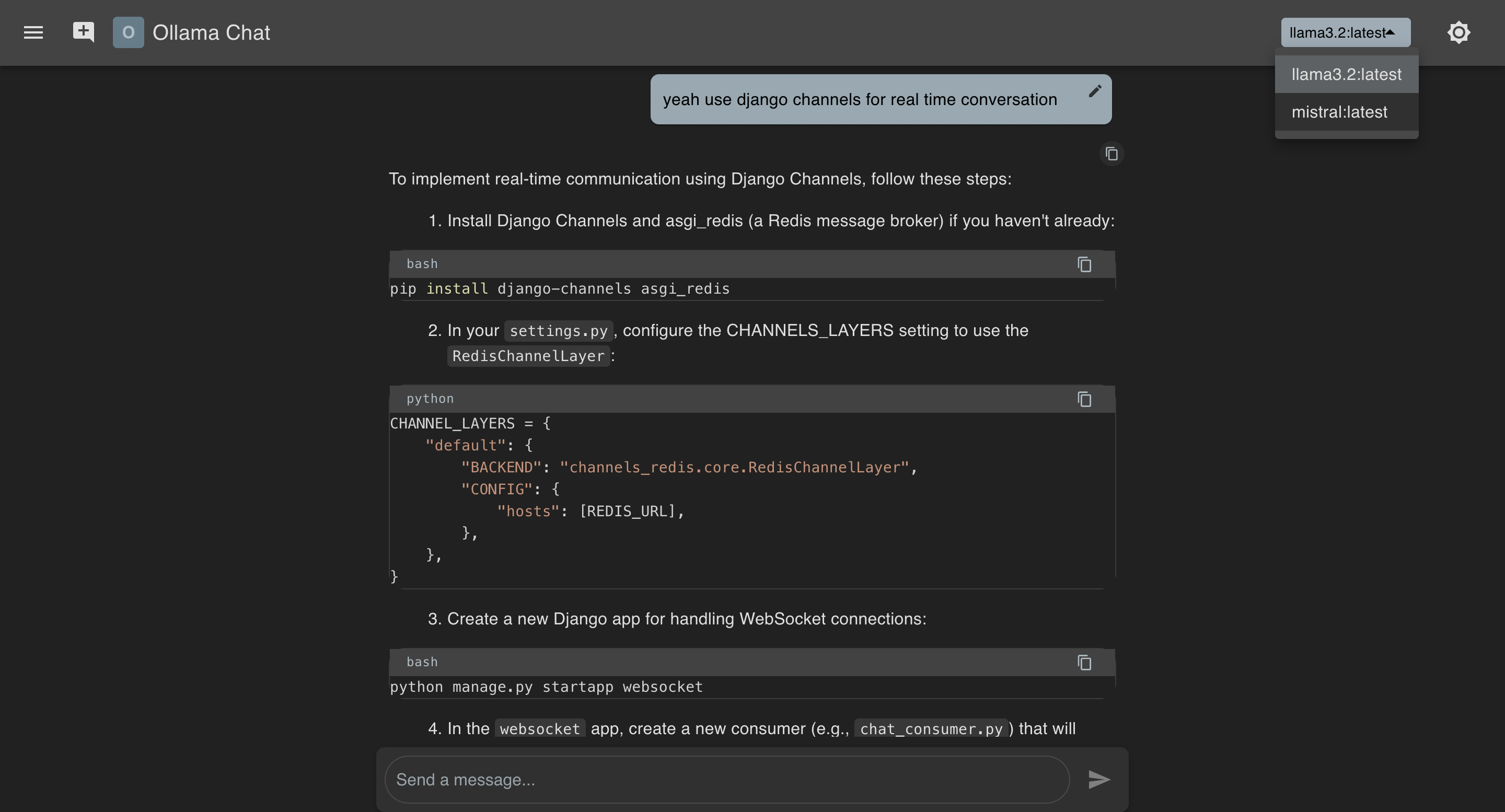
Ollama Chat is a modern, responsive chat application built with React and TypeScript, integrating with the Ollama API for AI-powered conversations. It features a clean Material-UI interface, chat history management, dark/light mode theming, and advanced chat functionalities like message editing, regeneration, and version navigation.
- AI Chat: Stream responses from Ollama models with real-time updates.
- Chat History: Persistent chat sessions with renaming and deletion options.
- Responsive Design: Adapts to mobile and desktop screens.
- Theming: Toggle between light and dark modes with Material-UI styling.
- Model Selection: Choose from available Ollama models dynamically.
- Message Management: Edit prompts, regenerate responses, and navigate response versions.
- Syntax Highlighting: Code blocks with copy functionality using
react-syntax-highlighter. - Error Handling: Graceful retries and cancellations for failed responses.
- Auto-Generated Titles: Smart titles based on conversation content.
- Frontend: React 19.1.0, TypeScript 4.9.5
- UI Framework: Material-UI 7.0.2
- Routing: React Router DOM 7.5.0
- Markdown Rendering:
react-markdownwithremark-gfm - Syntax Highlighting:
react-syntax-highlighter - API Integration: Custom Ollama API client
- Styling: MUI
styledcomponents - State Management: React hooks with localStorage persistence
- Node.js: Version 16+ (due to
@types/nodedependency) - Ollama Server: Running locally or at a custom URL (default:
http://localhost:11434) - npm or yarn: For dependency management
-
Clone the Repository:
git clone https://github.com/yourusername/ollama-chat.git cd ollama-chat -
Install Dependencies: Using npm:
npm install
-
Set Up Ollama Server:
- Ensure an Ollama server is running at http://localhost:11434 (default).
- To use a custom URL, set the REACT_APP_OLLAMA_URL environment variable:
export REACT_APP_OLLAMA_URL="http://your-ollama-server:port"
Alternatively, create a .env file in the root directory:
REACT_APP_OLLAMA_URL=http://your-ollama-server:port
-
Start the Application:
npm start
-
Access the Application:
- Open your browser and navigate to
http://localhost:3000.
- Open your browser and navigate to
-
Start a Chat:
- Click the "New Chat" button in the header or sidebar.
- Type a message in the input field and press Enter or click the Send button.
-
Manage Chats:
- View History: Toggle the sidebar with the menu icon.
- Rename: Click the three-dot menu on a chat and select "Rename".
- Delete: Use the same menu to delete a chat.
-
Interact with Messages:
- Edit: Click the edit icon on a user message to modify and resend.
- Regenerate: Use the regenerate button to get a new response.
- Copy Code: Click the copy icon in code blocks.
- Version Navigation: Use arrows to cycle through response attempts.
-
Switch Models:
- Select a model from the dropdown in the header (fetched from the Ollama API).
-
Toggle Theme:
- Click the sun/moon icon in the header to switch between light and dark modes.
ollama-chat/
├── src/
│ ├── components/
│ │ ├── ChatHistory.tsx # Sidebar with chat list and actions
│ │ ├── ChatWindow.tsx # Main chat display with messages
│ │ └── Header.tsx # Top bar with model selector and controls
│ ├── services/
│ │ └── ollamaAPI.ts # API client for Ollama integration
│ ├── styles/
│ │ └── index.ts # Custom styled components
│ ├── types/
│ │ └── index.ts # TypeScript interfaces for chat data
│ ├── theme.ts # MUI theme configuration
│ ├── App.tsx # Main app logic and routing
│ └── App.css # Global styles (if any)
├── package.json # Dependencies and scripts
└── README.md # This file
- Ollama URL: Set via
REACT_APP_OLLAMA_URL(defaults tohttp://localhost:11434). - Persistence: Chats and theme preferences are saved in
localStorage. - Font Sizes: Locked at
1rem = 16pxfor consistency (seetheme.ts).
- Add new API endpoints in
ollamaAPI.ts. - Enhance
ChatWindow.tsxfor additional message features. - Customize
theme.tsfor different color schemes.
.png?raw=true "Ollama Chat")
.png?raw=true "Ollama Chat")
- Fork the repository.
- Create a feature branch (
git checkout -b feature/YourFeature). - Commit changes (
git commit -m "Add YourFeature"). - Push to the branch (
git push origin feature/YourFeature). - Open a Pull Request.
This project is licensed under the .
- Ollama for the AI backend.
- Material-UI for the UI components.
- React Syntax Highlighter for code rendering.