


- The EC2 instance can be connect using different mechanisms like SSH, RDP etc.,
- Along with the popular options AWS offers the Systems Manager (SSM) Session Manager to connect the EC2 instance.
- SSM Session Manager a powerful feature that allows secure tunneling and remote management of EC2 instances.
- It provides the ability to handle various types of traffic, including SSH, HTTPS, RDP, or other protocols, all without the need for traditional access mechanisms like opening ports or assigning public IPs. Additionally, it allows logging capabilities and an audit trail for compliance purposes.
Kindly note, I have created two different modules for demo purpose. Both the modules have different set of VPCs and other infra around it.
If you are planning to run this in your AWS, please check the main.tf file.
You can run the modules seperately to check both the ways SSM works.
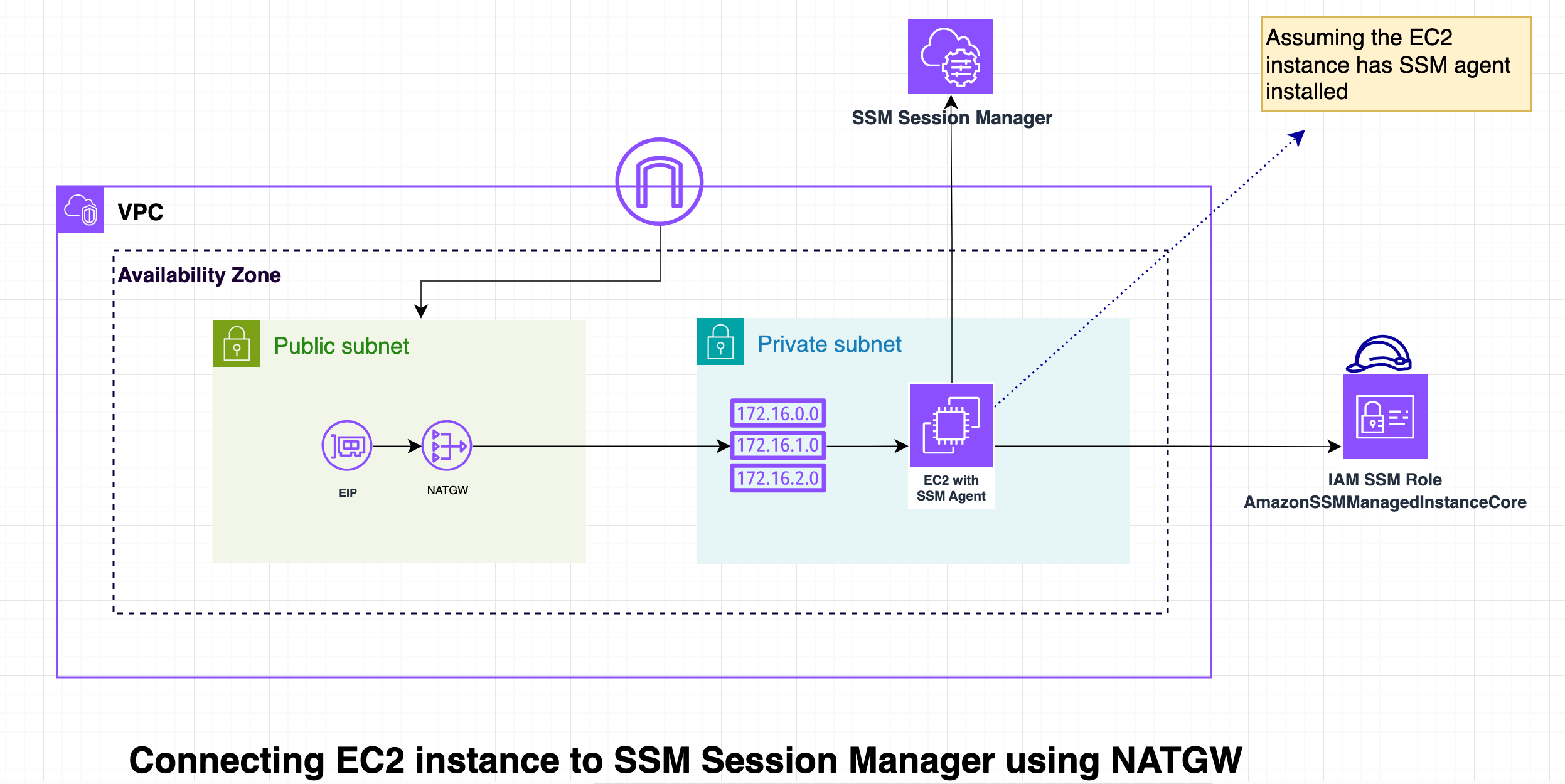
- Through public connectivity or using NAT Gateway:
1.1 The EC2 instance would need internet access with public IP (instances in public subnet) to communicate with the Systems Manager service along with NAT Gateway in case the instance is in private subnet.
1.2 Even though communication happens over the internet, all data transferred between the instance and SSM is encrypted using TLS (HTTPS), ensuring data security.
1.3 Connecting to Session manager using public connectivity should be only used in non-production / development Environments
- Using VPC endpoints:
2.1 VPC endpoints allows EC2 instances to communicate with SSM without even leaving the AWS network, enhancing security and performance by eliminating the need to traverse the public internet.
2.2 It increases security since it does not require public IP addresses or NAT Gateway/Instances.

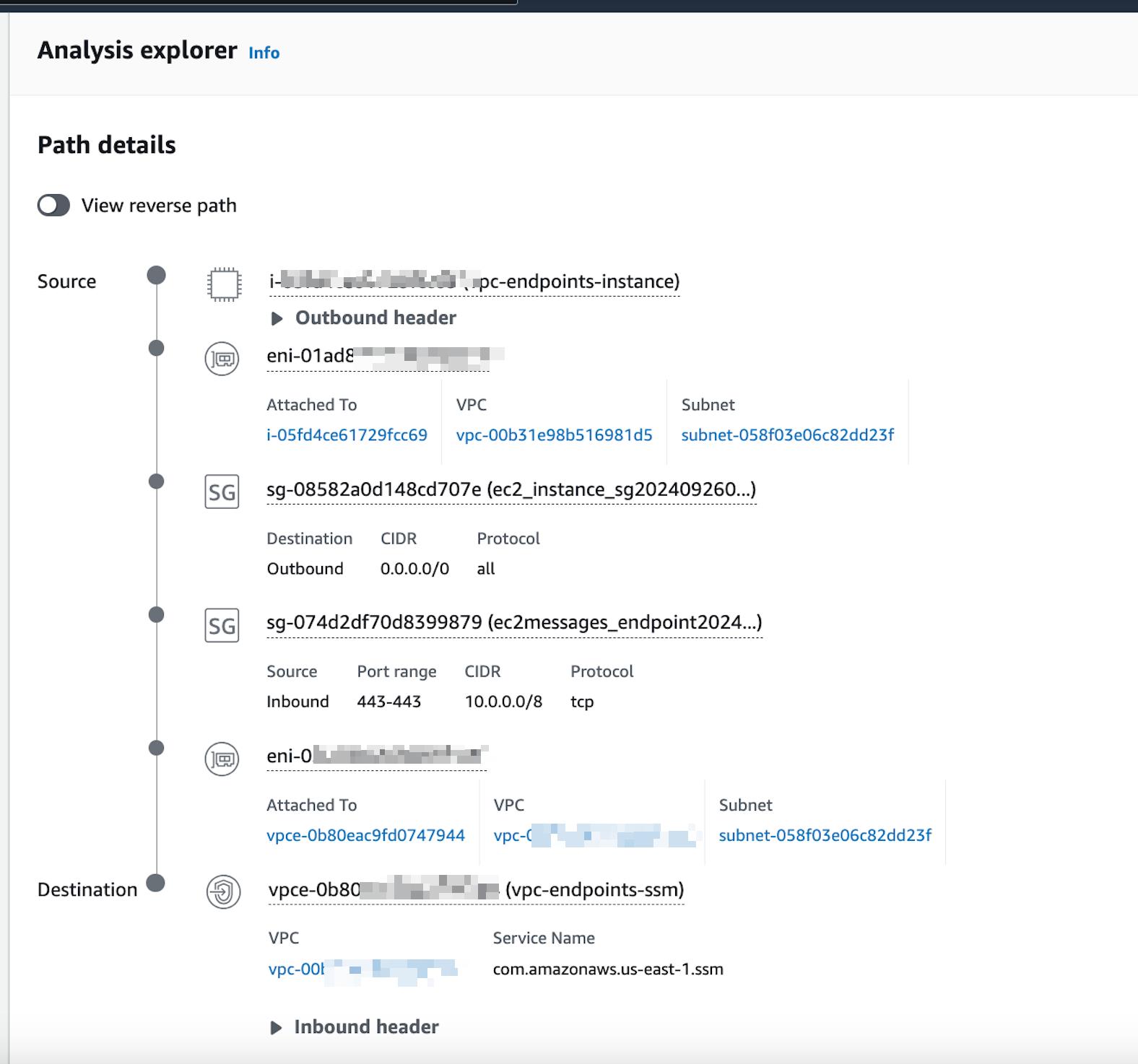
2.3 The reachabilty analyzer test can br used to ensure that the instance can connect to our interface endpoints.
2.4 At the end of the test the reachability state shows success and the analysis can be shown as follow:
- Comprehensive Logging:
1.1 All actions performed via Session Manager are logged in AWS CloudTrail. This ensures the admin will have detailed audit trail that captures who initiated a session, when it was started, and the actions taken during the session. - Security Benefits:
2.1 Knowing exactly who accessed the instance and what actions were performed is crucial for security and compliance audits.
2.2 Every session creates detailed logs that help track any anomalies or unauthorized access. \
- Single way to connect all the instances irrespective of the instance type.
- No Need for SSH or RDP Ports. EC2 instances can be connect securely without opening traditional access ports.
- Secure as admins get the control to audit all the logs since every session creates detailed logs that help track any anomalies or unauthorized access.
- A large team with different EC2 instance type and which recides in different VPCs require access to the instances using CLIs.
- The first team might request access using SSH and other using RDP and so on.
- Managing such a large pool of instances and different authentication mechanisms will be overhead for the admins.
- Hence instead SSM Session Manager can be use to tackle the problem since it requires only single mechanism to access all instances. Also helps in logs auditing.